Advanced Pricing Format
It is possible to import advanced pricing to Shopware 6 as a part of your product update. The corresponding information can be added to a product CSV in the advanced_prices column.
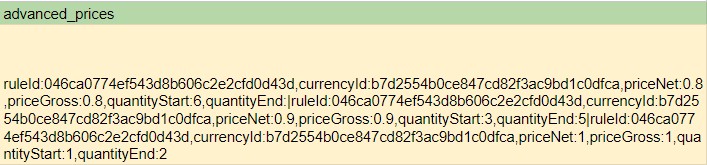
The value in this column should look as follows:
ruleId:046ca0774ef543d8b606c2e2cfd0d43d,currencyId:b7d2554b0ce847cd82f3ac9bd1c0dfca,priceNet:0.8,priceGross:0.8,quantityStart:6,quantityEnd:|ruleId:046ca0774ef543d8b606c2e2cfd0d43d,currencyId:b7d2554b0ce847cd82f3ac9bd1c0dfca,priceNet:0.9,priceGross:0.9,quantityStart:3,quantityEnd:5|ruleId:046ca0774ef543d8b606c2e2cfd0d43d,currencyId:b7d2554b0ce847cd82f3ac9bd1c0dfca,priceNet:1,priceGross:1,quantityStart:1,quantityEnd:2This complex value consists of attributes and values that describe multiple rules or price tiers. Tiers are separated by a pipe (|), and the attributes within each tier are separated by a comma (,).
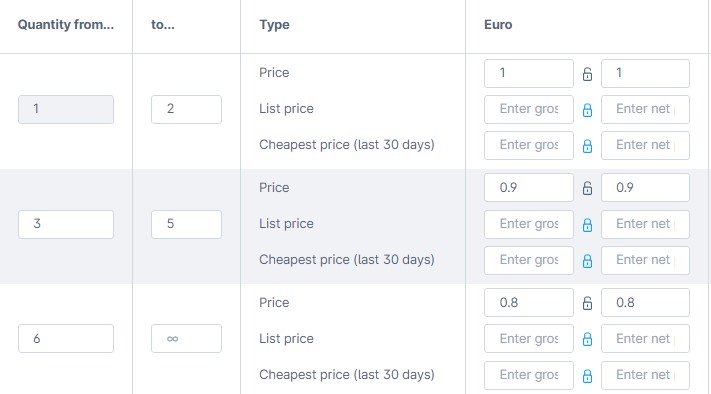
The value above represents the following three price tiers:
- The price is 1 Euro if a customer orders 1-2 items.
- The price is 0.9 Euro if a customer orders 3-5 items.
- The price is 0.8 Euro if a customer orders 6 or more items.
Field Reference
Section titled “Field Reference”| Column Name | Description | Value |
|---|---|---|
ruleId | The alphanumerical rule ID used in Shopware. | 046ca0774ef543d8b606c2e2cfd0d43d |
currencyId | The alphanumerical currency ID used in Shopware. | b7d2554b0ce847cd82f3ac9bd1c0dfca |
priceNet | A product net price used in this rule. | 0.8 |
priceGross | A product gross price used in this rule. | 0.8 |
quantityStart | The minimum amount of items that should be purchased to apply the rule. | 6 |
quantityEnd | The maximum amount of items that should be purchased to apply the rule. Leave blank to set the upper limit to infinity. | 8 |
Note that you can replace the existing advanced prices with the ones specified in your CSV by activating the Replace Advanced Prices feature.