SEO URLs
Every successful website needs to address SEO URLs, and Shopware provides built-in SEO URL functionality to streamline your optimization efforts. The platform supports SEO URLs for both products and categories. While Shopware doesn’t natively support importing SEO URLs, our Improved Import, Export & Mass Actions app fills that gap.
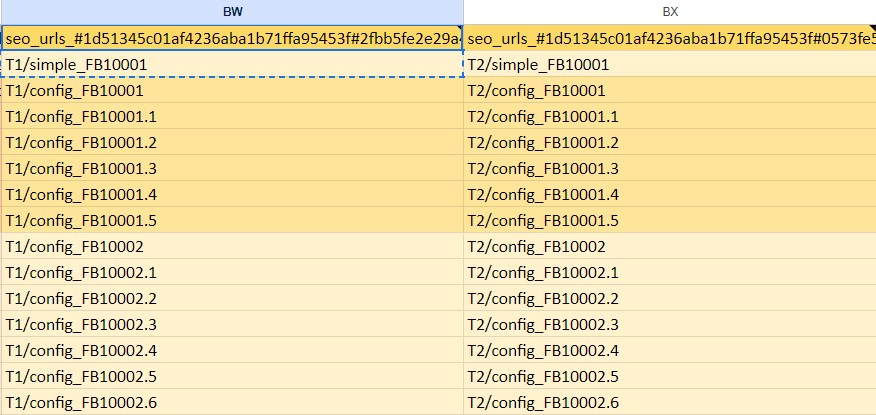
Since you can add multiple custom SEO URLs for different store languages, your CSV file with product updates can include several columns for SEO URLs. Each Shopware 6 SEO URL attribute must start with seo_url_#, followed by the sales channel ID and the language ID, as shown in this example:
seo_urls_#1d51345c01af4236aba1b71ffa95453f#2fbb5fe2e29a4d70aa5854ce7ce3e20bBe sure to use # to separate the sales channel ID from the language ID.
The attribute value can include any characters and spaces, allowing you to enter SEO-friendly URLs for your Shopware update, such as “seo-friendly-product-page”.
Below is an example of Shopware 6 SEO URL attributes and values ready for import, as outlined in our Google Sheets Master Table: