File Formats & MIME Types
The app currently supports CSV, XML, and XLSX file formats. Additionally, you can specify the delimiters used in the CSV file manually, or click the “Auto detect delimiter” checkbox and let the extension do the job.
XML File Format
Section titled “XML File Format”Note that for XML import to Shopware 6 your file structure should be organized as follows:
<list> <item> … </item> <item> … </item></list>Where column names (attributes or properties) are stored between <item> and </item>.

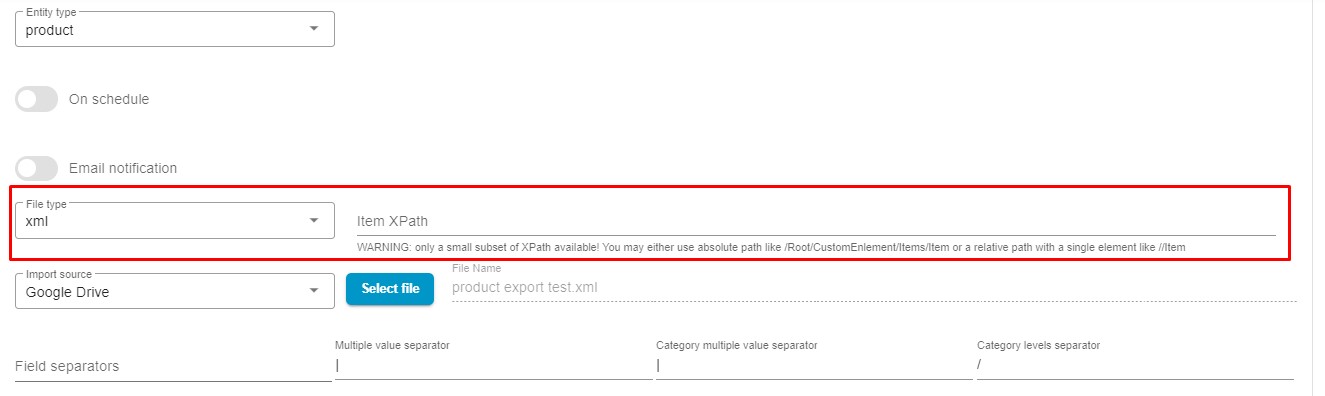
Additionally, the latest release of our app includes an XPath input feature for specifying data paths in XML files. This allows you to select relevant data structures, such as products or customers, with greater precision.
MIME Type Validation
Section titled “MIME Type Validation”When entering a URL for importing, it’s crucial to ensure that the file type matches the format required by the application. The app cannot handle all file formats, so using an incompatible URL - like an image URL for a CSV import - will result in an error.
To prevent this, the application checks the file’s MIME type and will not download the file if the MIME type is unsupported.
MIME type, short for Multipurpose Internet Mail Extension, is a standard that indicates the file format. It’s a key characteristic of any digital resource, influencing its accessibility and usability.
Here’s the current list of MIME types supported by the application:
"csv" => [ "text/html", "text/csv", "text/comma-separated-values", "text/x-comma-separated-values", "text/tab-separated-values", "application/x-csv", "application/csv", "text/plain", "application/octet-stream"],"xml" => [ "text/html", "application/xml", "text/xml"],"xlsx" => [ "application/vnd.ms-excel", "application/vnd.openxmlformats-officedocument.spreadsheetml.sheet"]If you import an unsupported file, the app displays the following error:
Failed! Bad url. mime/type mismatch or max size exceeds