Manufacturer Filter for Advanced Prices Export
The Manufacturer Filter allows you to export Advanced Prices only for products belonging to a specific manufacturer. This helps you generate more targeted export files, reduce data volume, and streamline integrations with external systems.
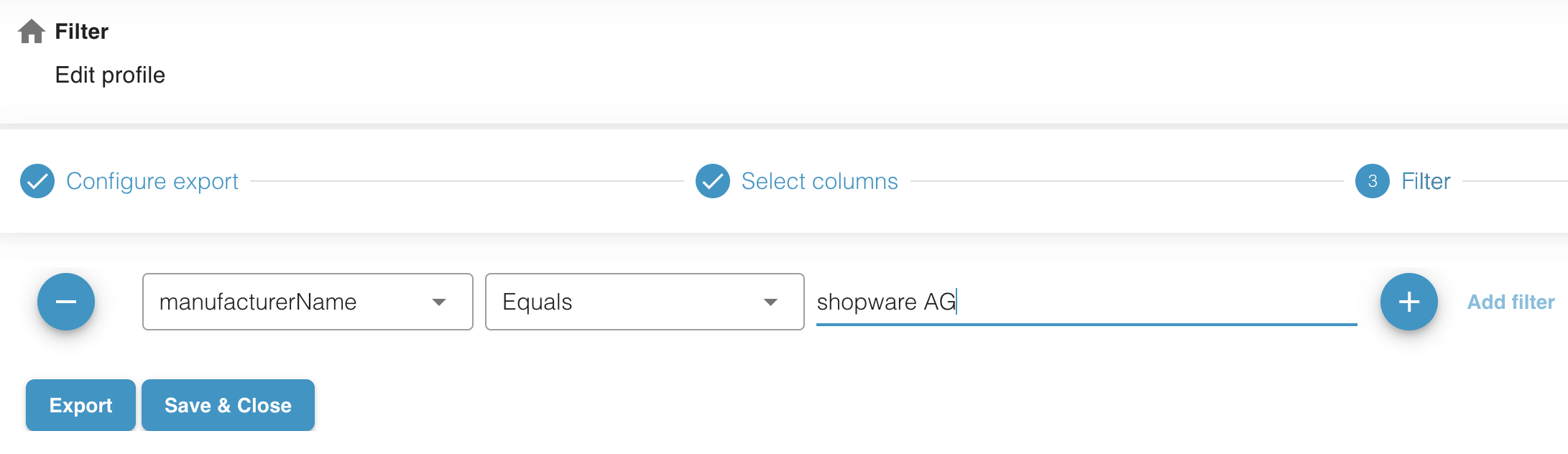
What This Feature Does
Section titled “What This Feature Does”A new filter option — manufacturerName — has been added to the Advanced Prices export. When used, the export job will include only products associated with the specified manufacturer.
This is especially useful when:
- A supplier requests price data only for their products
- You manage multiple brands and need separate pricing files
- External systems import prices per manufacturer
- You want to reduce export size during testing
How It Works
Section titled “How It Works”The filter accepts one manufacturer name as the filter value.
The name must match the manufacturer defined in your Shopware catalog.
Example
Section titled “Example”If you enter:
manufacturerName: "Nike"The export will include only Advanced Prices for products whose manufacturer is set to Nike in Shopware.
If you leave the filter empty, the export includes all manufacturers.
Where to Configure
Section titled “Where to Configure”You can use the filter in any Shopware Advanced Prices export job:
Export Job → Filters → Advanced Prices → manufacturerName
Enter the manufacturer name exactly as it appears in your Shopware admin.
Limitations
Section titled “Limitations”- The filter currently supports one manufacturer value per export job.
- Multiple manufacturers (e.g., Nike, Adidas) are not supported yet.
- If the name does not match any manufacturer, the export will return an empty dataset.
Benefits
Section titled “Benefits”- More precise control over Advanced Prices export
- Smaller, cleaner export files
- Simplified integration with vendor-specific pricing workflows
- Less post-processing required when working with multi-brand catalogs