Custom Fields
For Firebear imports, all custom field names must begin with cf_. Following this prefix, include the technical name of the custom field.
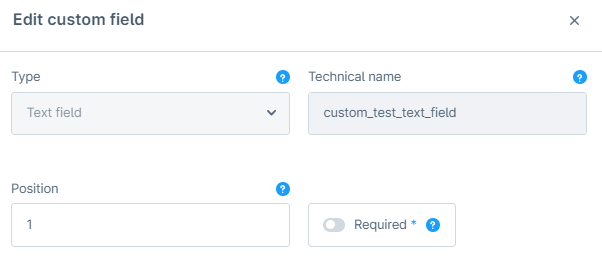
For instance, to import data associated with the custom_test_text_field custom field, you need to add the cf_custom_test_text_field column to your CSV.

Importing New Products in Shopware 6.5
Section titled “Importing New Products in Shopware 6.5”- When importing a custom attribute of the
cf_type, values are successfully imported for all languages, not just the main language. - There are no translation columns for custom attributes of the select type, so translations for these cannot be imported.
- Similarly, there are no translation columns for custom price attributes, preventing the import of translations for these as well.
- For custom attributes like checkboxes and active switches, the same value is imported across all languages, even if different values are specified in the import file.
Updating a Product in Shopware 6.5
Section titled “Updating a Product in Shopware 6.5”- If you update the select attribute in the
cf_column, it is only updated in the main language; other languages are not affected. - Updating the price attribute in the
cf_column also only affects the main language. - For checkboxes and active switches, if you specify different values for different languages, the import will maintain those distinct values without resetting or updating them to match the main language.
- For custom attributes such as text fields, date/time, number fields, media fields, color pickers, and text editors, you can successfully import translations and unique values for the custom field both when importing a new product and during updates.
Importing New Products in Shopware 6.4
Section titled “Importing New Products in Shopware 6.4”- When importing a custom attribute of the
cf_type, values are imported only for the main language; other languages are not included. - There are no translation columns for custom attributes of the select type, so translations cannot be imported.
- For custom attributes like checkboxes and active switches, different values are imported for different languages if specified in the import file.
Updating a Product in Shopware 6.4
Section titled “Updating a Product in Shopware 6.4”- If you update the select attribute in the
cf_column, it is only updated in the main language, with no changes in other languages. - For checkboxes and active switches, if different values are specified for different languages, the import process will maintain these values across languages, rather than resetting them to the main language’s value.
- For custom attributes such as text fields, date/time, number fields, media fields, color pickers, and text editors, you can import translations and unique values for the custom field both when importing a new product and during updates.
In both versions, Shopware allows for flexible import and update processes, but with different capabilities regarding language support and translation of custom attributes.