Replace Product Sales Channels
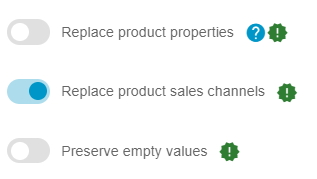
This feature allows you to fully control which Shopware sales channels each product is assigned to, and define exactly how visible the product should be in each channel when importing data.
Supported Fields
Section titled “Supported Fields”Sales Channel Columns
- salesChannel — List of sales channel UUIDs, each optionally paired with a visibility value
- salesChannelNames — List of sales channel names, each optionally paired with a visibility value
Visibility Values
- 10 — Hidden from listings and search (accessible only via direct link)
- 20 — Hidden from listings (visible in search results)
- 30 — Visible in listings and search (default)
Data Format Examples
Section titled “Data Format Examples”CSV Example with Channel Names
productNumber, salesChannelNamesSW10001, Storefront:30SW10002, Headless:20|Storefront:30SW10003, StorefrontCSV Example with Channel IDs
productNumber, salesChannelSW10001, 019527ca391372d5a256adf8a79152a0:30SW10002, 98432def39fc4624b33213a56b8c944d:20|019527ca391372d5a256adf8a79152a0:30SW10003, 019527ca391372d5a256adf8a79152a0Multiple Sales Channels
Use | (pipe) to separate entries:
salesChannelNamesHeadless:20|Storefront:30|API-Channel:10Import Behavior
Section titled “Import Behavior”Replace Mode (Enabled)

- Complete Replacement — All existing sales channel assignments for the product are removed.
- New Assignment — Only the channels specified in the import file are assigned.
- Visibility Update — If the same channel is included, its visibility is updated.
Update Mode (Disabled)

- Preserve Existing — Existing sales channel assignments remain unchanged.
- Add/Update Only — New channels are added, but existing ones are not updated.
- No Removal — Channels not listed in the import are retained.
Visibility Handling
Section titled “Visibility Handling”- Explicit Values — Use colon notation, e.g., Storefront:20
- Default Visibility — If no value is provided, visibility defaults to 30 (fully visible)
- Valid Range — Only 10, 20, and 30 are accepted
Data Format Rules
Section titled “Data Format Rules”- Channel Identification Priority: If both IDs and names are provided, IDs take precedence
- Format:
channelIdentifier:visibilityValue - Multiple Channels: Separate entries with pipe (|)
Use Case Examples
Section titled “Use Case Examples”Basic Assignment
productNumber, salesChannelNamesSW10001, StorefrontResult: Product assigned to Storefront with default visibility (30)
Specific Visibility
productNumber, salesChannelNamesSW10001, Storefront:20Result: Product visible in search only
Multiple Channels
productNumber, salesChannelNamesSW10001, Storefront:30|Headless:20|B2B-Portal:10Result: Different visibility levels across channels
Channel Removal (Replace Mode)
productNumber, salesChannelNamesSW10001, Storefront:30Result: All previous channel assignments removed; only Storefront remains
Important Notes
Section titled “Important Notes”- Channel Validation:
- All sales channels must exist in Shopware prior to import
- Channel names are case-sensitive
- Invalid names or IDs will trigger import errors
- Performance:
- Replace Mode performs delete operations; large imports may take longer
- Existing visibility IDs are retained to ensure referential integrity
- Compatibility
- Works with CSV and XML import files
- Supports new products and updates to existing products
- Error Handling
- Invalid visibility values (anything other than 10, 20, or 30) will cause errors
- Non-existent channels will stop the import
- Improper formatting (missing ”:” or ”|”) will be rejected